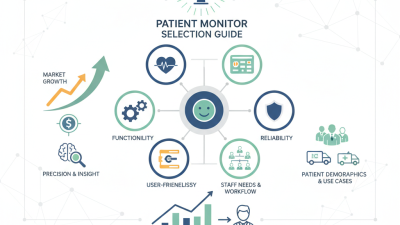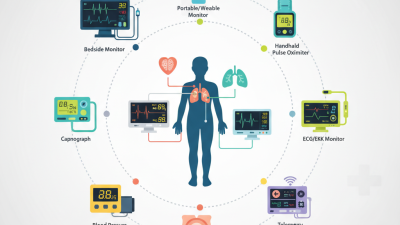
Choosing a Patient Monitor in 2026 is not simply a matter of comparing screen size or price. The right device must fit the care setting, patient population, and staff workflow. A bedside unit in an intensive care room faces different demands from a portable monitor used during transport. Battery life, signal quality, alarm customization, and interoperability all matter. Small differences become important at 2 a.m., when a nurse needs a clear reading without another avoidable alarm.
The market is expanding, but growth alone does not identify the best product. Grand View Research valued the global patient monitoring devices market at USD 45.1 billion in 2023 and projected an 8.8% compound annual growth rate from 2024 to 2030. That figure signals investment, not guaranteed performance. Buyers should check clinical evidence, service support, cybersecurity documentation, and total ownership costs. The Joint Commission has also highlighted risks associated with clinical alarm systems, making alarm management a practical safety consideration.
Patient-safety researcher Dr. Christopher Bonafide’s published work examines how nonactionable physiologic monitor alarms can affect clinical responses. His research offers a useful reminder: an alarm should be meaningful, not merely audible. That distinction deserves attention. This guide compares core monitoring capabilities, care-setting requirements, usability, connectivity, and lifecycle costs. It also flags a limitation: no specification sheet can show how a device feels during a crowded shift. Hands-on evaluation and clinician feedback still matter.
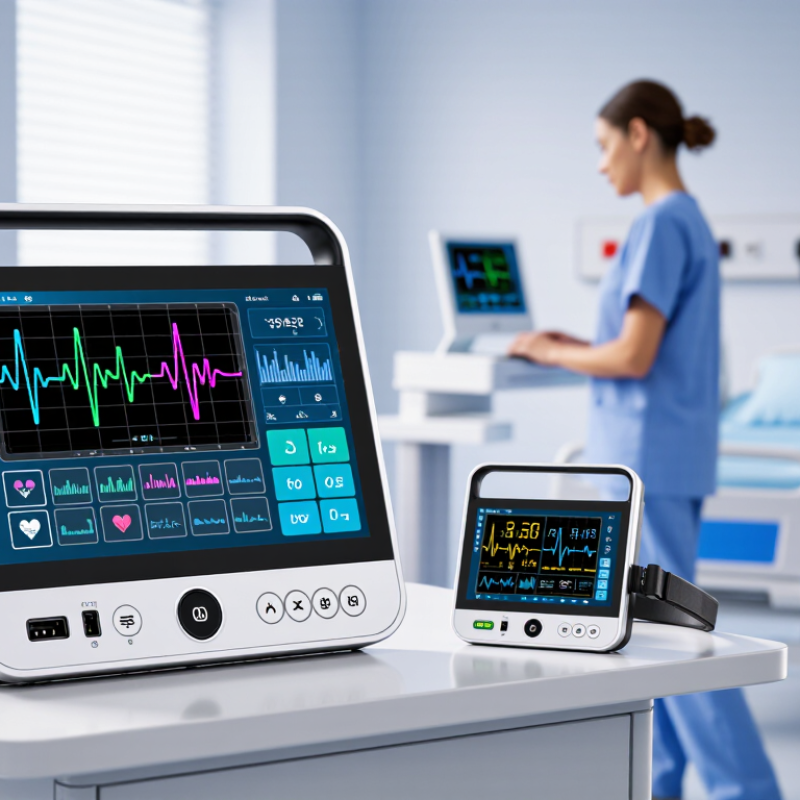
Patient monitors serve different clinical jobs, so the right choice starts with the care setting and the decisions staff must make. At an intensive care bedside, a multiparameter monitor may display ECG, oxygen saturation, blood pressure, and temperature together. Continuous trends help clinicians notice changes, but only when sensors are placed correctly and alarms are set for that patient. Small details matter. A loose pulse-oximeter probe on a cool finger can produce unstable readings. In a general ward, a spot-check device may suit scheduled observations better than a full bedside system.
Mobility changes the role. Telemetry supports observation of a patient’s heart rhythm while they move around a ward. A transport monitor needs a secure handle, readable display, and dependable battery for transfers between departments. More features are not automatically better. The awkward part is that a device can be technically capable yet poorly matched to daily work. Selection should consider patient acuity, required measurements, cleaning routines, alarm practices, and staff training. Ask clinicians to test the screen while wearing gloves and moving around a real care space. Cables that snag during turning, or alarms that are hard to review, can make an otherwise suitable monitor frustrating to use.
Choosing a patient monitor starts with the care decision, not the screen size. What changes management: heart rate, oxygen saturation, blood pressure, temperature, or another measurement? Match the available parameters to the patient’s condition and the clinical team’s protocol. More measurements are not automatically better. They can add alarms and workload without improving care. Start with the patient. Consider whether readings are needed continuously, at set intervals, or only during specific assessments. That detail matters.
Then picture the actual monitoring environment. A bedside unit in a staffed ward faces different demands from a portable monitor used during transfers or in a busy recovery area. Check who will view the readings, how quickly staff can respond, and whether cables, cleaning routines, or limited outlets could disrupt use. Keep the workflow visible. A display that looks clear in a quiet room may be harder to read under bright lights or from across a crowded space. Alarm settings also need to suit the patient and care plan, rather than relying on default values. There is no perfect setup. Teams can overlook small practical issues, so walk through a typical shift and ask where monitoring might interrupt care—or fail to provide information when it is needed.
Compare the number of parameters in these illustrative monitoring profiles when matching a monitor to its care environment.
Example profiles: transport—ECG, SpO₂, NIBP; general ward—ECG, SpO₂, NIBP, temperature, respiration; operating room—ECG, SpO₂, NIBP, temperature, respiration, EtCO₂; ICU—ECG, SpO₂, NIBP, temperature, respiration, invasive blood pressure, EtCO₂. Counts are derived from these listed parameters, not market averages or universal requirements. Actual needs depend on the patient, clinical protocol, and environment.
Choosing a patient monitor in 2026 means matching its measurements to the people and setting where it will be used. Check which parameters are essential, such as oxygen saturation, blood pressure, temperature, or ECG, and whether the monitor supports the sensors your team needs. More measurements do not automatically mean better care. A monitor may show many values while making the important ones harder to notice.
Accuracy depends on more than the monitor itself. Motion, poor sensor contact, and low peripheral perfusion can affect readings, so review performance information under relevant conditions. Ask how the device signals uncertain or unavailable measurements. Not just specs. Alarm options matter too: adjustable limits and clear priority levels can reduce distraction, but overly quiet settings may hide a change that needs attention. Match alarm configuration to clinical protocols, and check that staff know how to adjust it.
The display should be readable from the usual viewing distance, including in dim rooms and at an angle. Look for clear labels, visible units, and trends that are easy to interpret at a glance. Color can help, but it should not carry meaning alone. Small details matter. I would still test the interface with the staff who will use it; a polished screen can feel confusing during a busy shift. Compare devices in realistic workflows, not only on a specification sheet.
| Comparison Factor | General Care Bedside Monitor | Transport Monitor | Critical Care Monitor |
|---|---|---|---|
| Typical setting | Medical-surgical wards, step-down units, and routine observation. | Patient transfers within a facility, emergency response, and mobile care. | Emergency departments, operating and recovery areas, and intensive care units. |
| Core measurements | Typically ECG heart rate, non-invasive blood pressure (NIBP), pulse oximetry (SpO₂), respiration, and temperature. | Usually ECG, NIBP, SpO₂, and respiration; temperature and other options depend on the configuration. | Typically core measurements plus configurable invasive blood pressure (IBP) and capnography (EtCO₂). |
| Measurement expansion | Check that the required ECG leads, temperature probes, and other accessories are supported. | Confirm that the selected configuration supports the measurements needed during transport, including compatible sensors and cables. | May support multiple IBP channels, EtCO₂, additional temperature channels, and other options; verify the exact configuration. |
| Accuracy checks | Review the specifications for each measurement separately. For NIBP, look for clinical validation against a recognized protocol, such as ISO 81060-2. | Check performance during movement and under the intended conditions. Motion, low perfusion, and sensor placement can affect readings, especially SpO₂. | Review the stated accuracy, operating conditions, and compatible accessories for every parameter. IBP accuracy also depends on setup, zeroing, and transducer leveling. |
| SpO₂ considerations | Check the stated saturation range and accuracy conditions; pulse oximeter accuracy may be reduced by motion, poor perfusion, or other sources of measurement interference. | Prioritize motion-tolerant performance and clear signal-quality indicators for mobile use. | Look for signal-quality information and suitable sensor options; do not assume a displayed value is reliable when the signal is compromised. |
| Alarm functions | Look for adjustable limits, clear visual and audible notifications, and a practical way to review or acknowledge alarms. | Confirm that alarms remain perceptible in the transport environment and that settings are not inadvertently changed during transfer. | Assess priority levels, parameter-specific limits, alarm history, and support for managing alarm settings across multiple monitored parameters. |
| Alarm standards and workflow | Review alarm behavior and configuration against applicable requirements, including IEC 60601-1-8 where relevant. | Check battery-powered alarm operation, audible output, and alarm visibility in the intended transport workflow. | Evaluate alarm prioritization, escalation or remote notification options, and integration with the unit’s alarm-management procedures. |
| Display and usability | A readable screen should make waveforms, numeric values, units, and alarm states easy to distinguish at the expected viewing distance. | Consider screen readability from different angles, straightforward controls, and a layout that is usable while moving the patient. | Consider how many waveforms and numeric values can be viewed at once, along with configurable layouts and clear trend presentation. |
| Trends and data | Check whether short-term trends and event review meet the ward’s observation and documentation needs. | Verify what data is retained during transport and whether it can be transferred to the receiving monitor or record system. | Assess trend duration, event review, data export, and compatibility with the facility’s clinical information systems. |
| Power and mobility | Check mains operation, backup power, mounting options, and cable management for the bedside setup. | Confirm battery runtime for the planned journey, charging arrangements, mounting security, and safe handling during movement. | Check backup power, mounting and expansion needs, and how added modules affect setup and day-to-day use. |
| Best fit when | The priority is dependable routine monitoring with a focused set of measurements and a straightforward interface. | The patient must remain monitored while moving between locations and the device needs to operate reliably on battery power. | Care requires a broader set of measurements, detailed trends, and workflows for managing multiple alarms and data sources. |
When choosing a patient monitor in 2026, look beyond the specification sheet. Ask nurses to use it during a realistic shift: adjusting alarm limits, reviewing trends, and moving between beds. Can they read the display from the doorway? Are controls manageable with gloves? Test alarm volume in a busy room, not a quiet showroom. Small details matter.
Connectivity deserves the same hands-on review. Check whether measurements and alarm events reach the intended clinical systems, and ask how the device behaves during a network interruption. Confirm compatibility with your existing infrastructure before purchase; “connects” can mean different things in practice. Request a demonstration using your own workflows, and clarify software update, access-control, and support responsibilities.
Compare total cost of ownership over the expected service life, not just the purchase price. Include sensors, cables, batteries, staff training, integration work, maintenance, and possible downtime. A low initial price may shift costs elsewhere. No checklist removes every surprise; local workflows often reveal gaps late. Leave room in the evaluation for a small pilot, and record what staff find confusing before wider deployment.
When comparing patient monitors, ask for evidence against IEC 60601-1 electrical-safety requirements and IEC 60601-1-8 alarm-system requirements. Verify the exact model, accessories, and intended use covered by each certificate. WHO’s Global Patient Safety Report 2024 estimates that about one in ten patients experiences harm in healthcare, with more than half of harm considered preventable. That is a reason to examine alarm performance closely, not just screen size. Ask staff to test alarm volume, priority levels, and visibility from the usual bedside position. Test it live. A quiet alarm in a noisy ward changes the calculation.
Service support matters after installation. Request response-time targets, preventive-maintenance schedules, spare-parts availability, and the process for software updates. Confirm who trains night-shift staff and how loan units are supplied during repairs. Procurement teams should also check local registration requirements, cybersecurity documentation, warranty terms, and compatibility with existing systems. Put these details in the tender, not only in sales discussions. Paperwork can look reassuring. It is not performance. Ask for references from similar care settings, then compare actual service records where available. A checklist may still miss a practical issue: whether staff can clean the monitor’s buttons and cables quickly between patients.